


The first time I tried to build an online store, I spent hours staring at the WooCommerce settings, feeling completely overwhelmed. Every option seemed important, and I worried I was making a mistake that would cost me sales down the road.
Like you, I just wanted to get my products online without a technical degree. Through years of building stores for myself and helping thousands of others, I’ve learned which settings truly matter from day one and which ones you can ignore.
In this guide, I’ll walk you through setting up your WooCommerce store the right way. I’ll use the simple, proven steps I wish I had when I first started, skipping all the confusion.
I’ll cover everything from getting your store online to picking the perfect theme and plugins to help you grow. Let’s get your store launched.
TL;DR: Want the fast version? To start a WooCommerce store, you’ll need a domain name and web hosting. I recommend using SiteGround WooCommerce Hosting because it comes with WordPress and the WooCommerce plugin pre-installed, plus a free SSL certificate.
From there, you just need to add your products, set up payments (like Stripe or PayPal), and choose a WooCommerce theme. This guide will walk you through every single step.
What Is WooCommerce?
WooCommerce is free eCommerce software that makes it easy to sell products and services online. Over the years, it has become the most popular eCommerce platform in the world, used by millions of small and large businesses (online stores).
WooCommerce is developed as an extension of WordPress, which is the most popular website builder on the market. This allows users to build an eCommerce website from scratch or add shopping cart functionality to an existing WordPress website.
As open-source software, WooCommerce is free to download and use. However, while the WooCommerce software is free, you still need a domain name and web hosting service to set up a website, which costs money.
I will talk more about WooCommerce pricing later in this article.
WooCommerce Pros and Cons
WooCommerce powers millions of online stores because it combines ease of use with the flexibility of WordPress. As an open-source platform, it gives you full control over your website, without licensing fees or platform restrictions.
Here are the main pros and cons of using WooCommerce:
| Pros of WooCommerce | Cons of WooCommerce |
|---|---|
| ✅ Free and open-source — no licensing fees, and complete control over your store. | ❌ Requires hosting and maintenance — you’re responsible for updates, security, and backups. |
| ✅ Highly flexible — thousands of WooCommerce and WordPress plugins let you add almost any feature. | ❌ Can become complex as your store grows and needs more add-ons. |
| ✅ Integrates seamlessly with major payment gateways like PayPal and Stripe, plus regional options. | ❌ Some payment gateways and advanced features may require paid extensions. |
| ✅ Unlimited products, sales, and customization options with full ownership of your data. | ❌ Performance depends on your hosting. Low-quality hosting can slow down large stores. |
| ✅ Huge community and wide selection of themes and tutorials for support. | ❌ Initial setup can take longer compared to hosted platforms like Shopify. |
Overall, WooCommerce is the best choice if you want flexibility, control, and scalability. However, it does come with a bit of a learning curve, especially if you’re new to managing your own WordPress site.
WooCommerce Alternatives
Want to see how WooCommerce compares against other popular eCommerce platforms? See the following comparisons to check out how it stacks up against the competition:
WooCommerce Store Examples
WooCommerce is very popular and used by many of the world’s top brands. Chances are that you have already visited WooCommerce-powered websites without even noticing it.
Here are some of our favorite examples of WooCommerce stores in action.
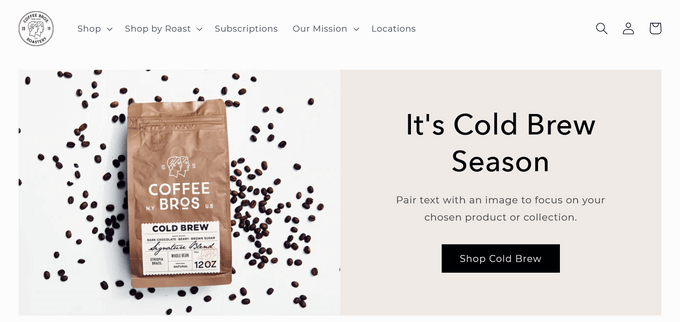
A clean and simple eCommerce website example, powered by WooCommerce, that sells classic and premium coffee blends.

Badeloft, a luxury bathroom fixture retailer, uses WooCommerce for its online store.
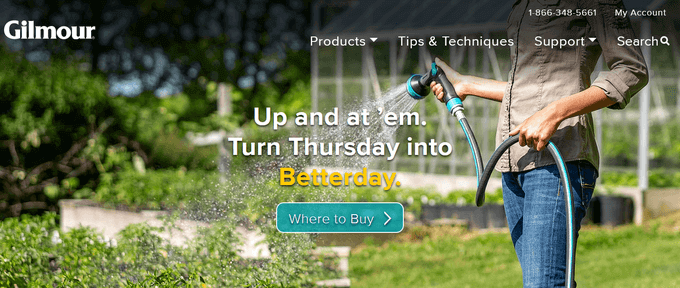
Popular gardening equipment brand Gilmour uses WooCommerce to sell products online. Their website is a balanced combination of functionality and simple design.

Flwr is a small floral design studio based in New Zealand. Their website features a simple and elegant design with a beautiful background and a highly customized shop page.
What Do You Need to Make a WooCommerce Store?
Before we dive into the setup, let’s quickly cover the three essential things every online store needs. I learned early on that getting these three pieces right from the start saves a ton of headaches later:
- WooCommerce Hosting: This is where all your website files, products, and customer data are stored. You need hosting that’s fast and secure specifically for online stores.
- A Domain Name: This is your store’s address on the internet, like
wpbeginner.com. It’s how your customers will find you. - An SSL Certificate: This creates a secure connection for processing payments and protecting customer information. It’s what puts the ‘https’ and the little padlock icon in your site’s address bar, and it’s absolutely non-negotiable for any online store.
While the WooCommerce software itself is free, these three components are a necessary investment for any kind of website. The good news is that you don’t have to buy them all separately.
I recommend choosing a hosting provider that specializes in WooCommerce because they typically bundle all of this together for a great price, making the setup process much smoother. Let’s look at the one I recommend for new store owners.
Here is an overview of all the topics I’ll cover in this ultimate WooCommerce guide. You can use the quick links below to quickly navigate through the article:
Step 1: Getting Started With WooCommerce
The first step is the most important because it involves building the foundation for your store. Here, we’ll choose the right hosting platform and get WordPress and WooCommerce installed.
Getting this right will set you up for success and make everything that follows much easier.
Choosing a Hosting Provider
When it comes to hosting a WooCommerce store, performance and support are key. A slow website will cost you sales. And if something goes wrong, you will need an expert team that understands eCommerce.
That’s why I recommend SiteGround WooCommerce for anyone starting a new online store. Their managed WooCommerce hosting is specifically optimized for performance, comes with WooCommerce pre-installed, and includes a free SSL certificate.
We use SiteGround to host several of our websites. And for WPBeginner readers, they offer a special discount, a free domain name, and a free SSL, which gives you everything you need to start.
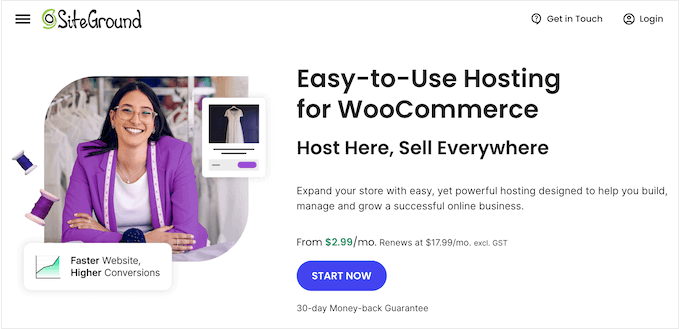
⭐ We host WPBeginner and several of our partner sites on SiteGround. To learn more about our experiences with this popular hosting platform, see our SiteGround review.
First, you’ll need to visit the SiteGround website and click the ‘Start Now’ button.
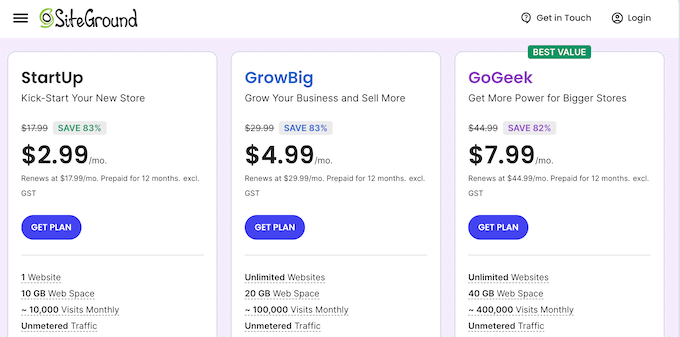
On the next page, you’ll see a few different plans. For a new store, the ‘StartUp’ plan has everything you need.
I always tell people you can easily upgrade later as your store grows, so there’s no need to overpay at the beginning. Click the ‘Get Plan’ button to continue.
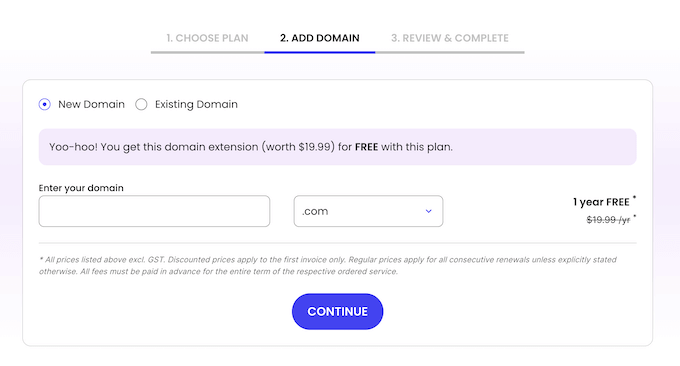
Next, you’ll be prompted to register a new domain name. This is included for free with your plan.
I have a few quick tips for picking the perfect domain name:
- Make it easy to remember and spell.
- Try to include a keyword related to your products if it sounds natural.
- Always stick with .com if you can.
- Avoid using hyphens or numbers.
For more tips, see our guide on how to choose the perfect domain name for your business. You can even use a domain name generator to help.
Now you can enter your chosen domain name and click the ‘Continue’ button.
Finally, you’ll need to fill in your account and payment information to complete the purchase.
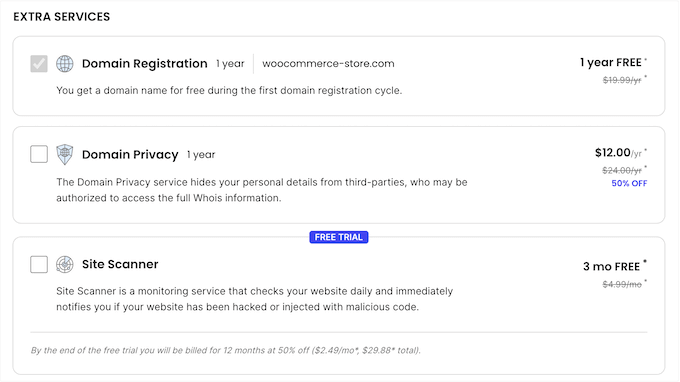
SiteGround will ask if you want to add any extras, like Site Scanner. I usually uncheck these because you can always add them later if you find you need them.
Once you’ve completed the purchase, you’ll get an email with details on how to log in to your hosting account dashboard. Now we’re ready to set up the store itself.
Installing WordPress and WooCommerce on Your Web Hosting
One of the reasons I recommend SiteGround is that they make this next part incredibly easy.
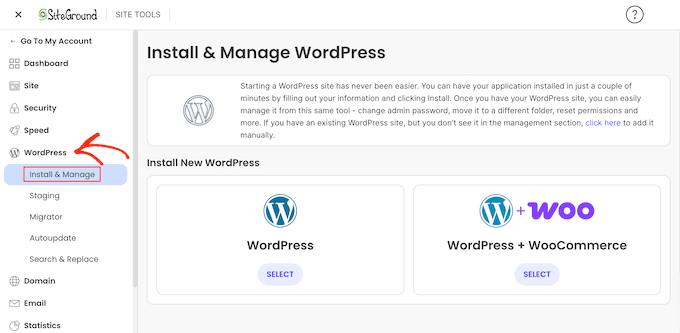
Simply log in to the Site Tools dashboard with the username and password you created when signing up for SiteGround. Here, select ‘WordPress’ then ‘Install and Manage’ from the menu.
You’ll be asked if you want to start a new website. Select that option and choose ‘WordPress + WooCommerce’ from the application list.
Tip: Most web hosting companies also offer 1-click WordPress installation. If you are using a hosting company that doesn’t, then see our step-by-step guide on how to install WordPress.
Next, you’ll create your login details for your new WordPress dashboard. Be sure to use a strong password and save it somewhere safe.
Once you’ve done this, click the ‘Install’ button and SiteGround will handle the entire installation process for you in the background.

After a minute or two, the installation will be complete, and you’ll see a success message.
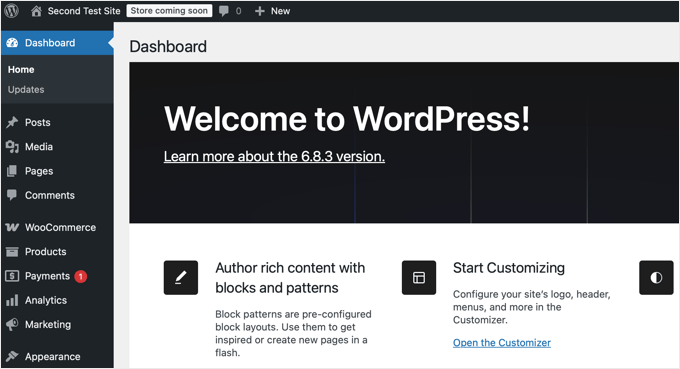
You can now log in to the WordPress dashboard by heading to yoursite.com/wp-admin/ directly in your web browser.
Welcome to your WordPress dashboard.
Confirming Your Core Website Settings
Before we start adding products, there are a couple of quick settings I always check.
First, go to Settings » General from the left-hand menu. Here, make sure your Site Title and Tagline are correct.
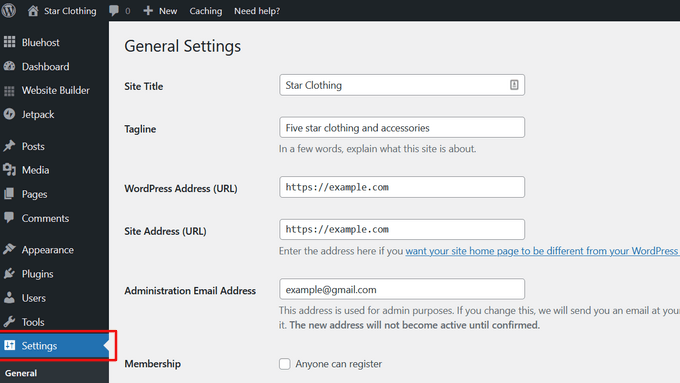
SiteGround automatically installs a free SSL certificate for your domain, which is essential for securely accepting payments. You can confirm this is active by going to Settings » General. Here, just make sure your WordPress Address (URL) and Site Address (URL) both start with https.
If you have used a different hosting provider and it is showing http, then you need to see our tutorial on how to enable free SSL in WordPress.
Next, you need to review the website admin email address. This email address is where you will receive WooCommerce notifications and password reset requests, so make sure that it is correct.
After that, scroll down a little and select the timezone settings for your website.
Now, you can click on the ‘Save changes’ button to save your settings.
Starting the WooCommerce Setup
With your website’s basic identity and security confirmed, it’s time to configure your store.
WooCommerce makes this very easy with a guided setup checklist. To get started, navigate to WooCommerce » Home from the left-hand menu.

On this page, you’ll see a list of key tasks to complete. This is the new, modern version of the old setup wizard, and it’s the perfect place to begin.
As you configure your WooCommerce store, you can always return to this page to view your progress and take the next step.
However, if your hosting provider has not automatically installed WooCommerce, then you can install the plugin manually using the instructions below.
How to Manually Install WooCommerce
WooCommerce is a WordPress plugin, so the installation process is similar to any other WordPress plugin.
You can follow our step-by-step guide on how to install a WordPress plugin.
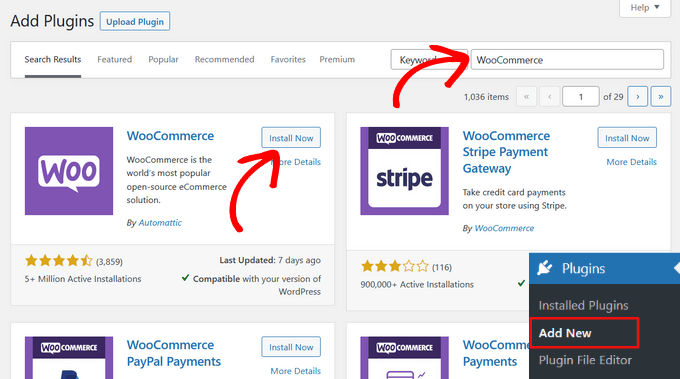
Simply visit Plugins » Add New page in your WordPress admin and search for WooCommerce. WordPress will now show plugin search results.
You need to click on the ‘Install Now’ button next to WooCommerce.
WordPress will now grab the plugin files and install WooCommerce for you.
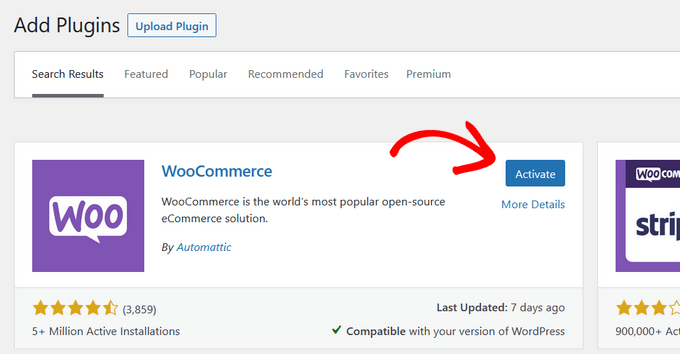
Once finished, you need to click on the ‘Activate’ button to start using it.
After activation, WooCommerce will launch a basic setup wizard. On the first page, simply click the ‘Set up my store’ button.
On the next page, choose the option that best describes your online store. After that, click the ‘Continue’ button.

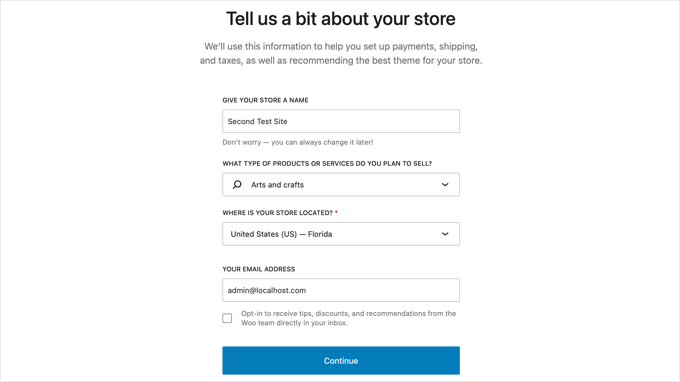
Now you can enter as much information as possible about your store.
You will be asked about your store name and type, its location, and your email address.
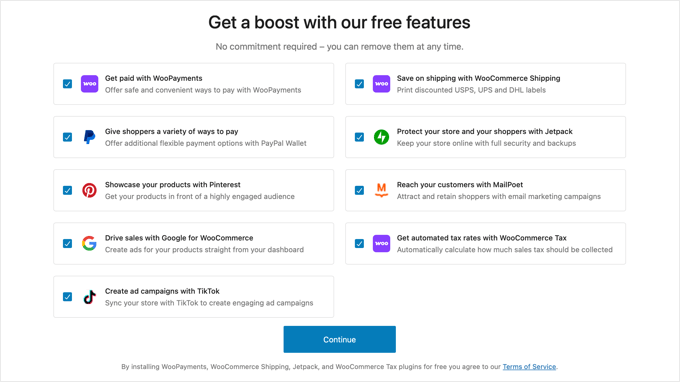
The wizard will also ask you if you want to add recommended business features to your store.
These features are free, so you can choose to install them and click the ‘Continue’ button.
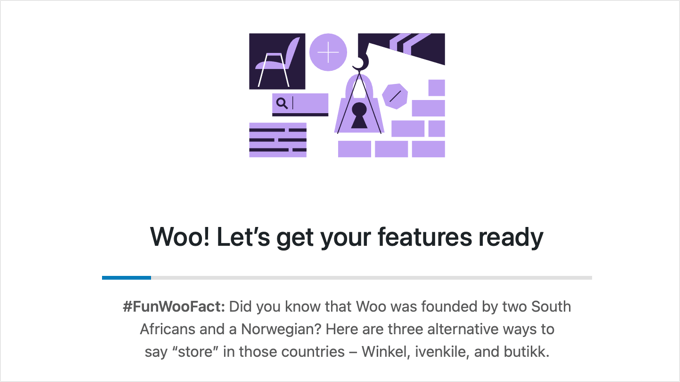
After that, the setup wizard will get the features you chose ready.
This will take a few moments, and a progress bar will be displayed.
Then, you’ll be redirected to WooCommerce » Home where you can finish setting up your store using the WooCommerce setup checklist and my instructions below.
Adding Products in WooCommerce
Now we’re ready for the most important part of your store: adding your products. This is where you’ll bring your items to life with great photos and descriptions.
Let’s walk through the process together.
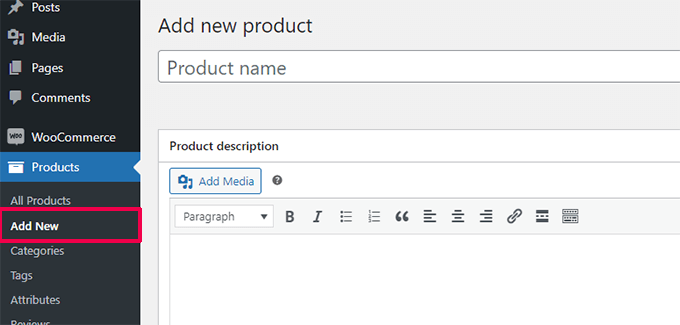
In your WordPress dashboard, navigate to Products » Add New. This will open up the product editor screen, which looks a lot like the standard WordPress editor, but with some powerful new sections for eCommerce.
Adding a Product Title and Long Description
The first thing I always do is give my product a clear and descriptive title. This is often the first thing a customer sees on your shop page, so it’s important to make it compelling.
Right below the title is the main description box. This is where you can really sell the product.
I like to write a few paragraphs here that cover all the key features, benefits, and details a customer would want to know. Think about the questions a shopper might have and answer them here. You can add images, create lists, and even embed videos in this section.
Configuring the Product Data
Below the main description editor, you’ll find the ‘Product data’ box. This might look tricky at first, but I’ll focus on the most important settings for your product page.
By default, the ‘Product type’ will be set to ‘Simple product,’ which is perfect for most physical goods that are sold without options like different sizes or colors.
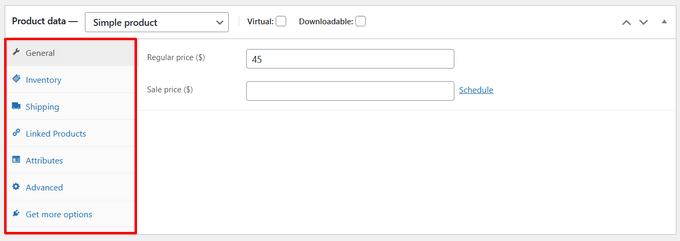
But don’t worry, WooCommerce is super flexible.
If you sell products with options like different sizes or colors, you’d choose ‘Variable product.’ If you’re selling things like ebooks or software, you can just check the ‘Digital’ or ‘Downloadable’ box. The process is very similar.
Setting Price, Inventory, and Shipping
Let’s start with the ‘General’ tab.
- Regular Price ($): This is the normal price of your product.
- Sale Price ($): If the item is on sale, you can enter the sale price here. It will automatically show the regular price crossed out, which is a great way to highlight a deal.
Next, click on the ‘Inventory’ tab.
The SKU (Stock Keeping Unit) is a unique tracking code for each product. While it’s optional, I highly recommend using one. It can be any system you like (e.g., TSHIRT-RED-LG), but it’s incredibly helpful for managing inventory as your store grows.
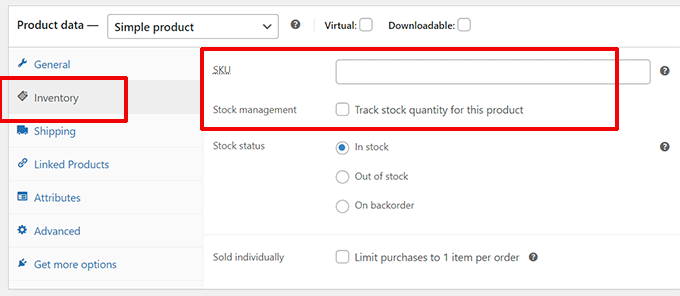
If you want WooCommerce to automatically track your stock levels, check the ‘Enable stock management at product level’ box. You can then enter the stock quantity, and WooCommerce will mark the product as ‘out of stock’ once it sells out.
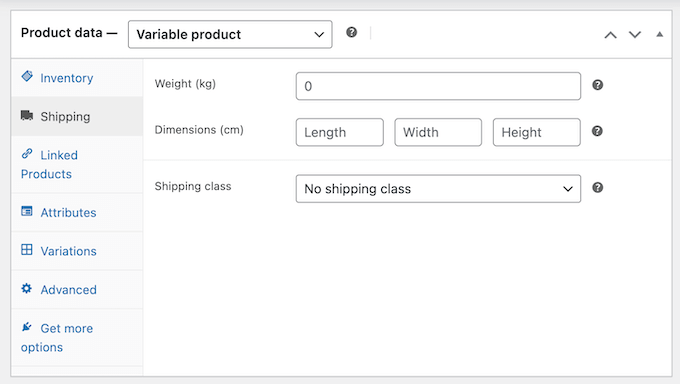
Now, click on the ‘Shipping’ tab.
Here, you can enter the product’s weight and dimensions. This is important if you plan to offer shipping rates that are calculated based on size and weight. If you’re using a simple flat-rate shipping method, you might be able to skip this, but it’s good practice to fill it in.
Writing a Compelling Product Short Description
If you scroll down past the ‘Product data’ box, you’ll find the ‘Product short description‘ section.
This is a really important piece of content. It’s the brief elevator pitch for your product that typically appears next to the product image, right above the ‘Add to cart’ button.
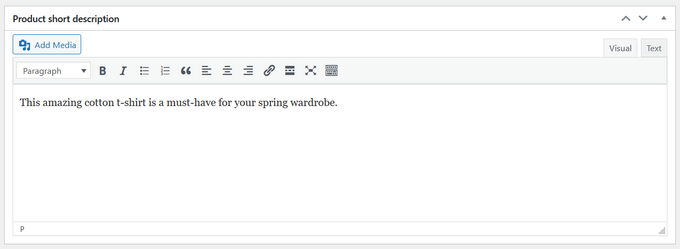
I always make sure this is short, snappy, and highlights the single biggest benefit of the product to grab the customer’s attention immediately.
Organizing Your Product with Categories and Tags
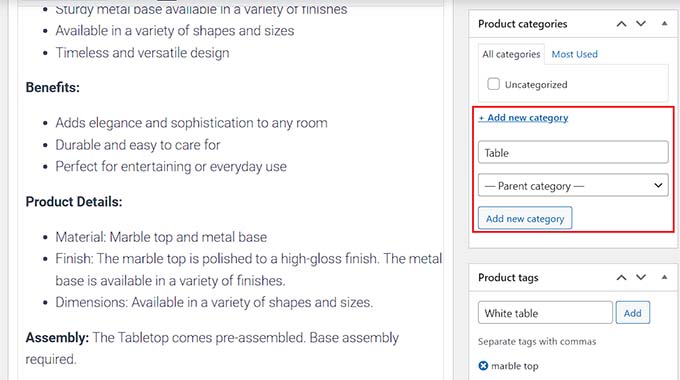
On the right-hand side of the screen, you’ll see several boxes for organizing your product.
Product categories are used to group similar products together. For example, if you sell clothing, your categories might be ‘T-shirts,’ ‘Hoodies,’ and ‘Hats.’ This helps customers browse your store and find what they’re looking for.
Product tags are more specific keywords. For that same t-shirt, you might use tags like ‘cotton,’ ‘summer,’ and ‘logo print.’ Think of them as more detailed labels.
Adding Your Product Images
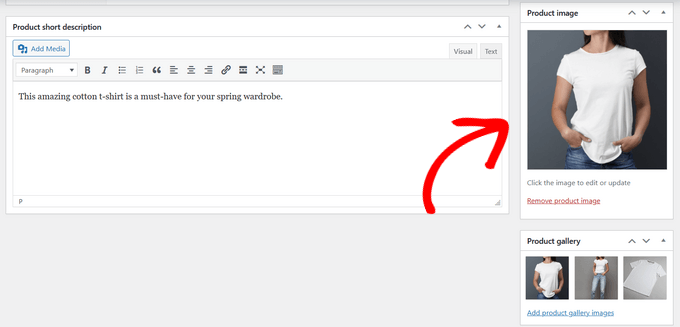
This is your single most important selling tool. People want to see what they’re buying, so I can’t stress this enough: use high-quality, clear photos.
In the bottom right, you’ll see two sections for images.
- Product image: This is the main, featured image for your product. It’s the one that will show up on the main shop page.
- Product gallery: This is where you can upload additional photos. I always add pictures from different angles, a lifestyle shot showing the product in use, and close-ups of any important details.
Publishing Your Product
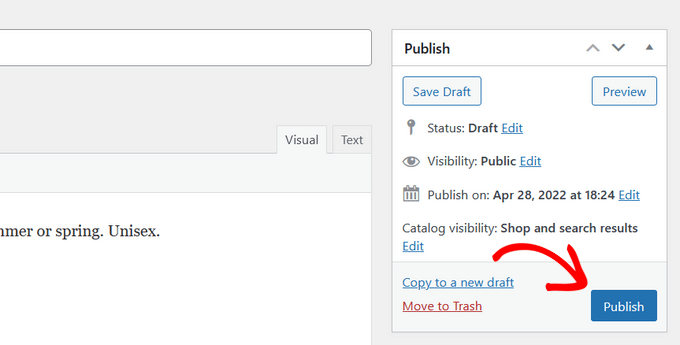
Once you’ve filled out all the details and added your images, take a moment to look everything over. You can click the ‘Preview’ button at the top to see how your product page will look to customers.
If everything looks good, click the blue ‘Publish’ button.
Congratulations, you’ve just added your first product to your WooCommerce store. You can now repeat this process to add all the other products you want to sell.
Setting Up Payments in WooCommerce
After adding your products, the next step is to figure out how you’re going to get paid. In my opinion, this is the most important part of the WooCommerce setup. A confusing or untrustworthy payment process is the fastest way to lose a sale.
Luckily, WooCommerce makes this incredibly easy and integrates with all the most popular payment gateways.
A good option for most new stores in supported countries is WooCommerce Payments. It’s the official, free solution from WooCommerce itself.
It lets you manage payments, track cash flow, and handle disputes right from your store’s dashboard without having to log into a separate service. It allows you to securely accept credit and debit cards, as well as options like Apple Pay and Google Pay.
It’s good to remember that all payment gateways, including WooCommerce Payments, Stripe, and PayPal, charge a small transaction fee for each sale. This is standard across the industry and is typically a small percentage plus a few cents per transaction.
If WooCommerce Payments isn’t available in your region, or if you prefer to use other gateways, the two industry standards are Stripe and PayPal. I’ve used both for years, and they are reliable choices. WooCommerce has built-in support for both.
To set them up, simply select ‘Set up payments’ from the checklist on the WooCommerce » Home page.
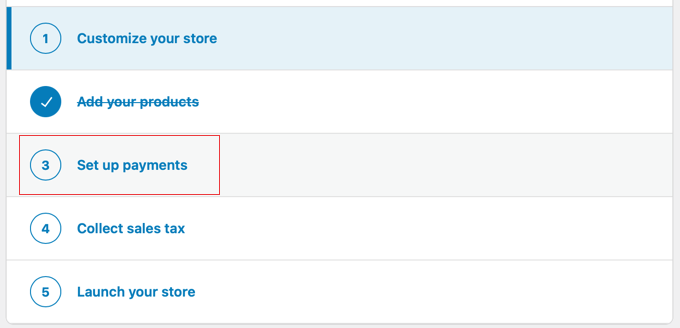
You can select your desired payment method and click the ‘Get Started’ button to install the necessary plugin and connect your account.
My advice is to start simple. Choose one primary method like WooCommerce Payments or Stripe for credit cards, and consider adding PayPal as a secondary option, as many customers prefer it.
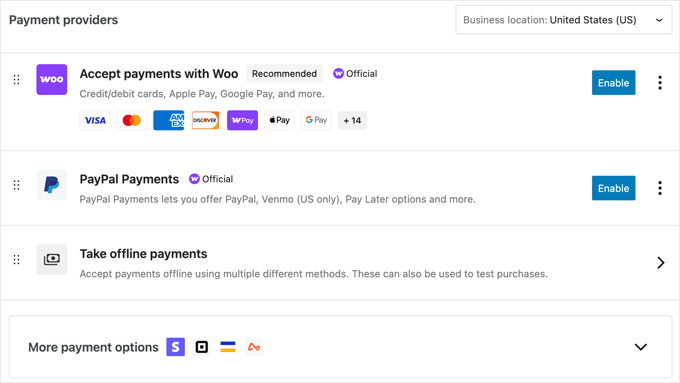
Note: While you can use WooCommerce’s default Stripe addon, we recommend using the free Stripe Payment Gateway for WooCommerce plugin instead. It comes with extra features like an easy setup wizard, one-click express payments via Apple and Google Pay, and more.
Next, I’ll show you how to configure your tax rates.
Setting Up Tax in WooCommerce
Setting up sales tax can feel scary, but I’ll show you a shortcut that handles almost all the heavy lifting for you.
Disclaimer: I’m not a tax professional, and the information below should not be taken as legal advice. Tax laws are complicated and specific to your location. I’m just showing you how to enable and configure the tax features within WooCommerce.
When you first install WooCommerce, it creates a helpful setup checklist to guide you through the essential steps. You can find this by going to WooCommerce » Home in your dashboard.
One of the items on that list will be ‘Collect sales tax’.
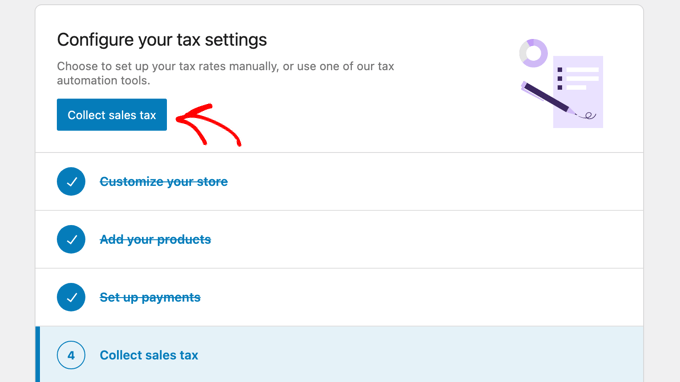
You need to click the button or section labeled ‘Collect sales tax’.
This will take you to a new page where you can choose how you want to handle taxes. You’ll see a couple of recommended options.
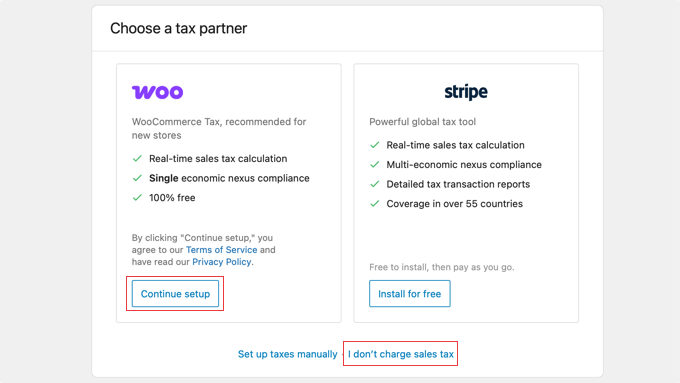
Here’s a breakdown of the choices:
- Woo (WooCommerce Tax): This is the option I recommend for most new stores. It uses a free, official plugin to automate your tax calculations in real-time. It’s the easiest and most reliable way to get started.
- Stripe: This uses Stripe’s own tax platform. It’s a good option if you’re already deeply invested in the Stripe ecosystem.
- I don’t charge sales tax: If you sell products or services that are not taxable, or if you don’t meet the requirements to collect sales tax, you can click this link at the bottom.
- Set up taxes manually: I don’t recommend this option. The manual method requires you to research and enter every single tax rate for every city and state, and keep them updated yourself. It’s a huge amount of work and very easy to make costly mistakes.
If you need to collect sales tax, then click the ‘Choose’ button for the Woo option to proceed with the automated setup.
This will launch a final, 3-step setup page.
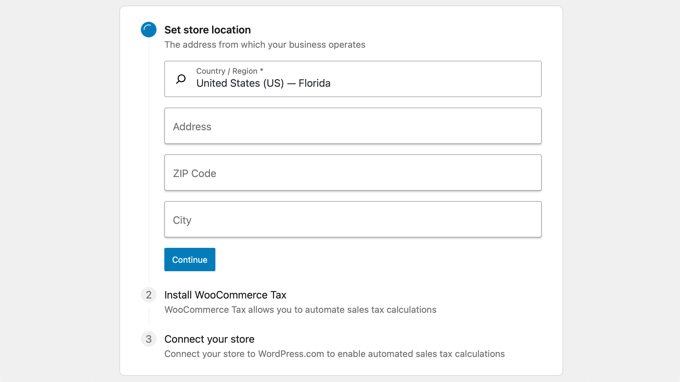
- Set store location: First, accurately fill in your store’s address and zip code. This is essential for the system to know which tax rates apply to you. Click ‘Continue’.
- Install WooCommerce Tax: In the next step, the wizard will automatically install and activate the free WooCommerce Tax plugin for you.
- Connect your store: Finally, it will connect your store to the secure, automated tax calculation service.
Once the process is complete, your store is fully set up to calculate and collect sales tax automatically at checkout. You can leave all the settings as they are and move on to the next step.
Setting Up Shipping in WooCommerce
Shipping can feel like one of the most complicated parts of running an online store. I remember being overwhelmed by all the different rates, zones, and classes when I first started.
The key is to break it down and start with the basics.
First, you need to go to the WooCommerce » Settings page and click on the ‘Shipping’ tab.
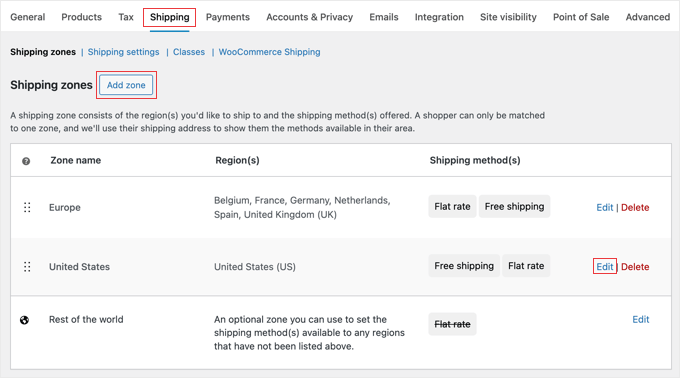
Here’s how I approach it:
1. Create or Edit a Shipping Zone
A ‘Shipping Zone’ is simply a geographic area that you ship to. This could be your home country, a specific state or province, or a group of countries like ‘Europe’.
I always start by creating a zone for my primary market first. Click ‘Add shipping zone’ to get started. Or if that zone already exists, simply click the ‘Edit’ link instead.
Give it a name (e.g., ‘United States’ or ‘Japan’) and then select the regions it applies to.
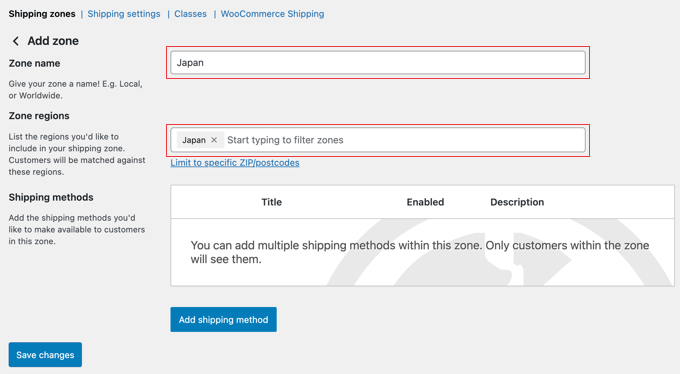
2. Add a Shipping Method
Once you have a zone, you need to tell WooCommerce how to charge for shipping within that zone. Click ‘Add shipping method’. You’ll see three simple options:
- Flat Rate: This is what I recommend starting with. You charge a single, fixed fee for shipping, like $5 per order. It’s simple for you and clear for the customer.
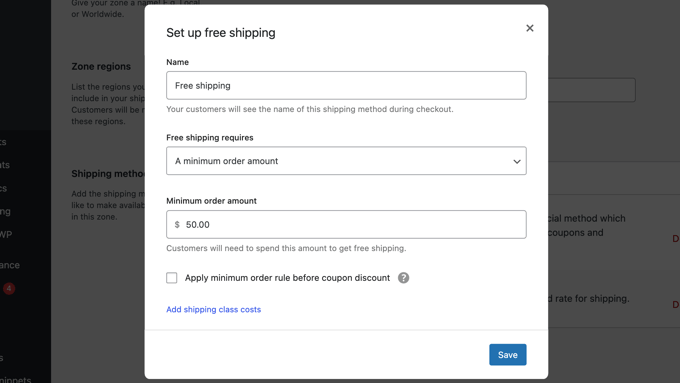
- Free Shipping: You can offer this for all orders, or set a condition, like ‘Free shipping on orders over $50.’ This is a great marketing tool.
- Local Pickup: This is for customers who can come to your physical location to pick up their order.

You can add multiple methods to a single zone. For example, you could offer a flat rate and free shipping for orders over $50. WooCommerce will automatically show the correct option to the customer at checkout.
Related: See how to hide WooCommerce shipping methods.
Once you have your first zone set up, you can repeat the process for any other regions you want to ship to.
Now that you’re finished setting up WooCommerce, let’s take a look at how you can further customize your store.
Step 2: Customizing Your WooCommerce Store
With the basic setup complete, it’s time for the fun part: making your online store look great and adding powerful features. A professional-looking and user-friendly store builds trust and helps turn visitors into customers.
In this step, I’ll cover choosing the right theme, extending your store’s functionality with plugins, and more.
Choosing a WooCommerce Theme
Choosing the right theme is one of the most exciting parts of building your store. It controls the entire look, feel, and layout of your website, and it’s how you’ll make a great first impression on your customers.

When I first started, the sheer number of themes felt overwhelming.
To save you from that headache, I’ve learned to focus on a few key things: a theme should be fast, reliable, and built to work perfectly with WooCommerce. A slow or poorly coded theme can hurt your sales and SEO rankings.
Over the years, I’ve tested dozens of themes on my own projects. Here are a few of my top recommendations that are perfect for any new WooCommerce store:
- Botiga: A clean, modern WooCommerce theme designed to help beginners launch an online store quickly. It’s easy to customize with built-in style options, responsive layouts, and one-click demo imports, so you can create a professional-looking shop without touching any code.
- SeedProd: If you want complete control over your store’s design without writing code, then SeedProd is the best choice. It’s a powerful drag-and-drop website builder that comes with pre-made WooCommerce blocks. This allows you to create completely custom product pages, checkout pages, and more.
- Storefront: This is the official theme developed by the same team that builds WooCommerce. You can think of it as the safest bet. While it’s a bit basic in its design out of the box, it’s rock-solid, fast, and you’re guaranteed to never have compatibility issues. It’s an excellent, no-frills starting point.
- Divi: Divi is another excellent option that comes with a powerful, integrated visual builder. It’s packed with design modules and layouts specifically for eCommerce, making it a great choice for those who want a highly customizable theme with a strong community behind it.
Just so you know, tools like SeedProd and Divi are full website builders, which give you more drag-and-drop control to create a completely custom design. Themes like Botiga and Storefront offer beautifully designed templates that you can customize, which is often a faster way to get started.
Any of these themes would be a fantastic choice for your store. If you would like more options, see our expert pick of the best WooCommerce themes.
What to Look for in a WooCommerce Theme?
Looking at all these professionally made WooCommerce themes, you may be wondering how to choose the right theme for your business.
The following are just some basic tips that you can use as a guideline:
- Strive for simplicity in design. A simple and clean design helps customers focus on what’s important and improves conversions
- Test your selected theme on mobile. Most users access the internet from mobile devices so make sure that the theme you are choosing looks great on smaller screens.
- Only download themes from the WordPress.org themes directory or reliable commercial theme shops. Themes from unreliable sources may have hidden malware, which could ruin your business.
- Check reviews and ratings to avoid any red flags
For more tips, see our guide on how to select the perfect WordPress theme for your project.
Once you have chosen a WooCommerce theme, see our guide on how to install a WordPress theme to set it up.
Installing WooCommerce Plugins
The real power of WooCommerce comes from its flexibility. There are thousands of plugins available for both WooCommerce and WordPress. You can use them to create contact forms, make landing pages, add pricing tables, gift cards, and more.
Installing them is just like installing any other WordPress plugin. You can learn how in my beginner’s guide on how to install a WordPress plugin.
Here are my top picks for must-have WooCommerce plugins for any eCommerce store. You don’t need to install all of them right away, but this list is a great starting point for when you’re ready to add more power to your store:
- WPForms – This is the form builder we use here at WPBeginner for our contact forms, surveys, and free business tools. It’s the easiest way to create any type of form for your store, from simple contact forms to complex order forms, without touching any code.
- MonsterInsights – We use MonsterInsights on all our sites to see how people find and use our content. Its enhanced eCommerce tracking makes it simple to understand your sales data right in your WordPress dashboard, so you know which products are performing best.
- SeedProd – It’s the best drag-and-drop page builder plugin for WooCommerce. It allows you to easily create beautiful landing pages to promote products, marketing campaigns, sale events, and more. You can even use it to create a custom checkout page or make a custom WooCommerce theme without any coding knowledge.
- AIOSEO – This is the SEO plugin we use on WPBeginner . It has everything you need to optimize your product pages and rank higher in search results, including powerful tools for schema markup and sitemaps specifically for WooCommerce SEO.
- FunnelKit – Helps you create sales funnels and customize WooCommerce checkout pages to add one-click upsells, order bumps, and other eCommerce automation to boost profits. It also comes with a marketing automation toolkit, FunnelKit Automations, which helps you set up email automation for WooCommerce.
- AffiliateWP – Lets you easily create an affiliate referral program for your WooCommerce store. Or you can use their RewardsWP plugin to set up a refer-a-friend program.
- Advanced Coupons for WooCommerce – Lets you add custom coupons for free shipping and BOGO offers. They have extensions for loyalty programs, gift cards, and more.
- OptinMonster – We use OptinMonster to create the popups, floating bars, and other campaigns you see on our site. It’s an incredibly powerful tool for converting abandoning visitors into email subscribers and paying customers with targeted offers.
- TrustPulse – Allows you to utilize the power of social proof and FOMO to instantly win customer trust and generate more sales
- AdTribes – Lets you create WooCommerce product feeds for advertising platforms like Google Shopping, shopping networks, and comparison sites.
- RafflePress – Helps you run viral giveaway campaigns to promote your store.
- PushEngage – Allows you to connect with visitors after they leave your website through web push notifications. You can send notifications for cart abandonment, browse abandonment, price drops, and more.
- MalCare – Protect your customers’ information from hackers with a security plugin designed specifically for WordPress and WooCommerce sites.
For a more comprehensive list, see my pick of the best WooCommerce plugins.
Note: You might see other guides recommending the Jetpack plugin by Automattic, but I don’t recommend it because it can bloat your site with unnecessary features.
Optimizing Your WooCommerce Store for Product Search
If customers can’t find a product, they can’t buy it. The default WordPress search is okay, but it’s not designed for eCommerce.
I’ve found that upgrading my store’s search function is one of the quickest ways to improve the user experience and boost sales, especially if you have more than a handful of products.
A smart product search can understand typos, search within product descriptions and categories, and show results instantly as the user types. This makes it much easier for customers to discover exactly what they’re looking for.
To get this functionality, I recommend using a dedicated search plugin. My go-to choice is SearchWP. It’s incredibly powerful and integrates seamlessly with WooCommerce.
It lets you control exactly what gets searched (including custom fields, product SKUs, and even PDF content) so you can deliver highly relevant results.
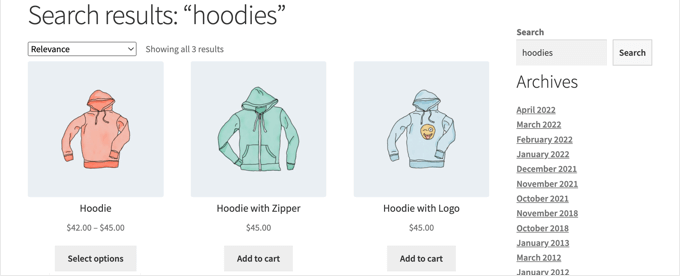
For step-by-step instructions on setting it up, you can follow our detailed guide on how to customize the WooCommerce product search results page.
Step 3: Testing Your WooCommerce Store Before Launch
I can’t tell you how many times I’ve seen people launch a store only to find out their payment form is broken or their shipping costs are wrong.
Before you announce your store to the world, it’s absolutely vital to test everything from a customer’s perspective. It only takes about 30 minutes, and it can save you from lost sales and customer frustration.
Here’s the pre-launch checklist I run through for every new store I build.
1. Place a Test Order
The most important test is to go through the entire purchase process yourself. Make sure to test every payment and shipping option you’ve enabled.
For example, do one test using a fake credit card with Stripe’s test mode, and another one checking out with PayPal. If you offer both flat rate and free shipping, test both scenarios to make sure the correct rates appear.
During this process, check:
- Are the product prices and shipping costs calculated correctly in the cart and at checkout?
- Do all the form fields on the checkout page work?
- Do you see a confirmation page after the order is complete?
2. Check Your Email Notifications
After your test order, you should receive at least two emails: one as the customer confirming the order, and one as the ‘store admin’ notifying you of a new sale. Check both emails. Do they look professional? Is all the information correct?
If you aren’t getting emails, you will need to use an SMTP plugin like WP Mail SMTP to fix your WordPress email deliverability.
For more details, see our guide on how to fix WooCommerce not sending order emails.
3. Test on Mobile Devices
Most of your customers will likely shop from their phones. A poor mobile experience is a guaranteed way to lose sales.
Open your store on your smartphone and browse a few product pages. Add an item to the cart and navigate to the checkout. Is the text readable? Are the buttons easy to tap?
4. Review Key Pages
Finally, do a quick visual check of your most important pages: the homepage, the main shop page, a few product pages, and your contact page.
Look for any typos, broken images, or formatting issues. Having a friend look it over is also a great idea, as a fresh pair of eyes can often spot things you’ve missed.
5. Go Live and Make Your Store Public
With your testing complete, the final step is to make your store visible to the public. While you were setting things up, WooCommerce likely enabled ‘Coming Soon’ mode to hide your work-in-progress.
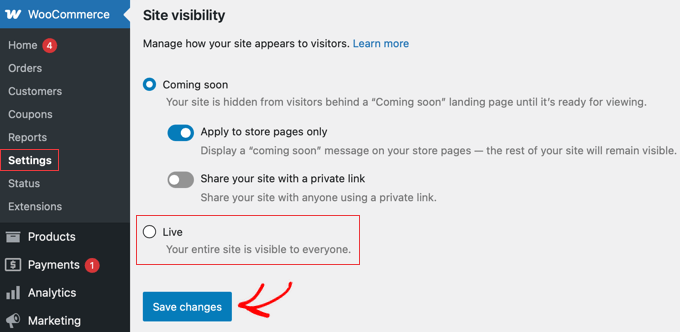
To go live, simply click the ‘Store coming soon’ message at the top of your WordPress admin dashboard. This will take you directly to WooCommerce » Settings and open the ‘Site Visibility’ tab.
From here, just select the ‘Live’ option and click the ‘Save changes’ button.
If you used a separate plugin like SeedProd to create a customized coming soon page, you’ll need to disable it from that plugin’s settings instead. For SeedProd, you would go to SeedProd » Pages and toggle the ‘Coming Soon Mode’ to ‘Inactive’.
And that’s it. Your store is now live and ready for customers. You can be confident that you’re ready to start selling.
Step 4: Growing Your WooCommerce Store After Launch
Now that your WooCommerce store is live, it is time to start promoting it to grow your business.
Here are some resources that will help you learn WooCommerce and grow your online store like an experienced pro.
Starting an Email List
Email marketing means sending messages to a list of people who have signed up to hear from you. It’s one of the most powerful ways to turn first-time visitors into loyal customers.
More than 90% of people visiting your WooCommerce store will leave without making a purchase. Losing these users is like losing money.
This is why building an email list is extremely important for online store owners.
An email list allows you to give customers a chance to stay in touch with you without buying anything. This opens a direct line of communication between you and the customers, so you can then try and convince them to make a purchase.
See our guide on how to properly start an email newsletter for your WooCommerce store for details and step-by-step instructions.
The great thing is that WooCommerce can connect with all major email marketing services in the world, including Constant Contact, HubSpot, Brevo (Formerly Sendinblue), Drip, and thousands more.
This is usually done using a separate connector plugin, which makes it easy to automatically add customers to your email list and send targeted campaigns.
Generating More Leads
Once you have an email marketing service, the next step is to actively encourage your website visitors to subscribe. This is called “lead generation” or “conversion optimization.”
While a simple signup form is a good start, using targeted campaigns like popups or floating bars can dramatically increase the number of people who join your list.
This is where OptinMonster can help. It is the best lead generation software in the world that allows you to easily convert abandoning website visitors into email subscribers and then paying customers.
For details, take a look at these tips on how to convert WooCommerce visitors into customers.
Tracking Your WooCommerce Visitors
Website visitor tracking, often called analytics, is the process of collecting data about how people find and use your store. This helps you understand your customers, like where they come from, what products they look at, and where they leave the buying process.
This is impossible without analytics. You need marketing data to make informed decisions. This data includes where your visitors are coming from, which products are popular, which products are not doing so well, and more.
These insights help you make data-driven decisions and adjust your marketing strategy.
MonsterInsights helps you easily make sense of all this data using Google Analytics. It comes with enhanced eCommerce tracking, which helps you unlock helpful data with just a few clicks.
For instructions, see our guide on how to track WooCommerce customers in Google Analytics.
Learning WooCommerce SEO
SEO, or Search Engine Optimization, is the process of getting your store to rank higher in search engines like Google. When someone searches for a product you sell, you want your store to be one of the first results they see.
WooCommerce itself is very SEO-friendly out of the box, but there is so much more you can do.
Since most beginners find WooCommerce SEO a bit technical, I’ve prepared a complete step-by-step WooCommerce SEO guide to help you do SEO without any expert help.
The shortcut is to use the AIOSEO plugin because it gives you everything you need to rank higher in SEO.
Recovering Abandoned Cart Sales
Abandoned cart recovery means automatically following up with shoppers who add items to their cart but leave without buying. With around 70% of online carts being abandoned on average, recovering even a small number of them can significantly boost your revenue.
One of the most effective ways to win them back is with an automated abandoned cart email.
I’ve compiled a cheat sheet to easily recover WooCommerce abandoned cart sales. This will give you a good head start and will help improve your overall sales.
Hopefully, these resources will help you improve your WooCommerce store and grow your business.
Video Tutorial
If you’d like a visual walkthrough of all the steps I covered in this guide, then just check out the video below:
WooCommerce Frequently Asked Questions
I know that starting an online store can bring up a lot of questions, especially around cost, technical skills, and choosing the right platform.
Having helped thousands of users get started, I’ve answered just about all of them. Here are the answers to the most common questions I hear from beginners.
1. How much does it really cost to run a WooCommerce store?
Running a WooCommerce store typically costs around $5–$20 per month to get started. That covers your domain name, web hosting, and SSL certificate, which are the three essentials every online store needs.
While the WooCommerce plugin is completely free, these services aren’t. The good news is that trusted hosts like SiteGround bundle them together, so you can launch your store for just a few dollars per month.
2. What is the difference between WooCommerce and Shopify?
The biggest difference comes down to ownership and flexibility. WooCommerce is a self-hosted platform, which means you have complete control and ownership over your store. It’s built on WordPress, giving you endless flexibility to customize everything.
Shopify is a fully hosted, all-in-one service where they manage the technical side for you. While Shopify can be simpler to start, you have less control, must follow their rules, and often pay higher monthly fees and additional transaction fees.
For a detailed breakdown, see my guide on WooCommerce vs. Shopify.
3. Do I need to know how to code to use WooCommerce?
Absolutely not. WordPress and WooCommerce are designed for beginners. You can build a beautiful and fully functional store without ever writing a single line of code. All the complex eCommerce functionality is handled by the plugin itself.
For design and layout, modern themes like Botiga and drag-and-drop page builders like SeedProd allow you to customize everything with a visual interface.
4. Can I use WooCommerce with any WordPress theme?
While WooCommerce can technically work with most themes, I strongly recommend using a theme that is WooCommerce-ready. This means the theme’s designers have specifically built and tested it to support WooCommerce.
Using a compatible theme ensures that all your shop pages, product layouts, and checkout processes will look professional and function correctly right out of the box. For example, Botiga is my recommended pick.
5. What kind of products can I sell with WooCommerce?
You can sell just about anything with WooCommerce. This includes physical products that need to be shipped, digital products that customers can download (like eBooks, music, or software), and even services. With extensions, you can also sell subscriptions, memberships, book appointments, and much more.
Additional Resources for Online Stores
Congratulations on getting your store up and running. Now that you’ve mastered the basics, you’re ready to explore more advanced features to improve your store’s appearance and boost your sales.
Here are a few extra guides you may find helpful on your journey:
- How to Add Product Badges in WooCommerce
- How to Edit WooCommerce Pages (No Coding Required)
- How to Add a Wishlist to Your WooCommerce Store
- How to Create Smart Coupons in WooCommerce
- How to Hide Prices in WooCommerce
- How to Setup WooCommerce Cart Recovery the RIGHT Way
- How to Connect Amazon FBA (MCF) to WooCommerce
- How I Use AI to Autogenerate WooCommerce Product Descriptions
- How I Send WooCommerce Order Notifications Straight to WhatsApp
- How to Give a First Purchase Discount in WooCommerce
If you liked this article, then please subscribe to our YouTube Channel for WordPress video tutorials. You can also find us on Twitter and Facebook.



Mrteesurez
Fantastic, this article is detailed enough and provided all information needed to setup a standard woocomerce store.
Is there anyway change the slug of the “shop” page to another ??
And also, how to I remove some endpoint in a woocomerce account page and add custom tab in the account page ??
WPBeginner Support
You can change the page and slug for your shop page under Woocommerce > Settings > Products tab. For changing endpoints and customizing it, you would want to check with WooCommerce’s documentation and support.
Admin
Jiří Vaněk
Thank you very much for the articles. For 2024, I have made it my mission to finally learn how to work with Woocommerce, because it is still a part of WordPress that I have never worked with and unfortunately I miss many of the basics. This article is great to start with before I move on to more details.
WPBeginner Support
Glad we could be helpful
Admin
Enricka Julien
I found this tutorial on setting up a WooCommerce store as a newcomer to eCommerce to be incredibly helpful. The step-by-step approach made it much easier to understand the complexities of eCommerce. The additional resources provided a deeper dive into specific areas of interest. Thank you for demystifying WooCommerce and making it accessible for beginners like myself! I am excited about more content like this.
By the way, I was wondering if you have any tutorials or blog posts on creating a table of contents linked to a specific paragraph, as I have noticed in this blog post and a few others?
WPBeginner Support
Glad you found our article helpful, for a table of contents guide we would recommend our article below:
https://www.wpbeginner.com/plugins/how-to-create-a-table-of-content-in-wordpress-posts-and-pages/
Admin
Donald Garber
It seems that WooCommerce and PayPal have parted ways. WooCommerce doesn’t offer PayPal as a payment option within this plug in. Might have to add another paypal plugin?
WPBeginner Support
There may have been a change recently but WooCommerce normally offers plugins to add functionality from their site itself to regain the ability to use it
Admin
ALAN
HI GUYS, Thanks so much for this guide. This was the first website that popped up in my search results! Very good. Greetings from holland
WPBeginner Support
You’re welcome, glad our guide is ranking well and is able to help you!
Admin
Lisa
Just wanted to say that I have found your site so useful and informative in setting up my own website. I have come to recognize and trust your website above all else. Thank you for sharing easy to follow & reliable info!
WPBeginner Support
You’re welcome, glad you found our content helpful!
Admin
JD
Was wondering if I should install a WP Theme or a Woo Commerce theme? I just am setting up a simple site to sell prints of my photographs. im assuming I just install a Woo Commerce theme.
thanks.
WPBeginner Support
You can install either of those, a WooCommerce theme is mainly a theme designed with WooCommerce in mind. You can use a non-WooCommerce theme and it could work just as well if you prefer the design of one over the other.
Admin
Anderson Bishop
You should remove coffeebros off this article they are now powered by Shopify.
WPBeginner Support
Thank you for letting us know, we will be sure to look into that when we update the article!
Admin
Paula
Can you use woocommerce for keeping track of inventory?
WPBeginner Support
Yes, you can set up inventory for your products on WooCommerce.
Admin
amy
What I am looking for is an explanation of how to add Paypal to WooCommerce.
WPBeginner Support
That is covered in step 3 and something that is a part of WooCommerce’s setup wizard or you can set it up under WooCommerce>Settings>Payments.
Admin
Tanya
Can you use WooCommerce with a GoDaddy Domain
WPBeginner Support
It seems like you may have some confusion, for a starting point you may want to take a look at our article below:
https://www.wpbeginner.com/beginners-guide/whats-the-difference-between-domain-name-and-web-hosting-explained/
Admin
ALEJANDRO
I want to become an expert on working with woocommerce. Thnx.
WPBeginner Support
Glad our guide can give you a starting point
Admin
Edward T Price
Some of the products I sell have restrictions on shipping to various states. Is there a way to add these restrictions for certain products and have it automatically cancel an order if the shipping address is restricted?
WPBeginner Support
You would want to check with WooCommerce for if that is currently an option, otherwise you would need to add a plugin for that functionality
Admin
Anita
Thank you for these detailed guide, my fear of WooCommerce just disappeared.
WPBeginner Support
Glad our guide was helpful
Admin
Grant Mathis
Really helpful article, on a really helpful site – I’m starting up (yesterday) and have lots to learn – thanks for the start!
WPBeginner Support
You’re welcome, glad our guides can be helpful
Admin
Guru Aum Jah
Given my personal experience with Jetpack causing problems with jump-links on my website, i was delighted when I read in this article that I could use other add on plugins instead of Jetpack.
The article stated that those other options would be listed below, but I could not discern which of anything listed were pertaining to whatever it is that Jetpack was supposed to be doing. As I write this, it is all compound by not knowing what we needed from Jetpack in the first place.
WPBeginner Support
The plugins we cover as alternatives are in Step 5 Installing WooCommerce Extensions and Add-ons
Admin
Ani
Thanks. I really appreciate the info given here.
I would like to get those kinds of icon you have at “I need help with…….” For my site
WPBeginner Support
To see how they are set up, you would want to take a look at our inspect element article here: https://www.wpbeginner.com/wp-tutorials/basics-of-inspect-element-with-your-wordpress-site/
Admin